New in the Training Hub

Meet the Social Studio

Create your school's entire social media content — framed pass photos, branded graphics, AI pictures and captions, ready to post to Facebook, Instagram and LinkedIn — from the same hub that runs your training records. No design skills, no separate tools, nothing to install.

★ Part of the Training Hub No design skills needed Runs in your browser
hub.driversitytrainingapp.com/social-studio
driversitySocial Studio
HomeSocial StudioPDI TrackerCPDTest Routes
🎉 Pass frames

Photo framed & ready to post

🎨 Branded graphics

"Automatic lessons available"

🖼️ AI pictures

Draft 3 · "make the car red"

✍️ AI captions

Written in your voice · ready to post

Why we built it

Marketing shouldn't be a second job

Every driving school does the same marketing jobs over and over — pass announcements, available slots, offers. Doing them properly usually means a design app for graphics, a chatbot for captions, fiddling pass photos into frames, then posting to each platform one by one. It's slow, it's inconsistent, and it happens late at night. Social Studio creates all of it in one place, in minutes — ready to post.

Inside Social Studio

Four ways to create, all in one place

The favourite
🎉

Pass-photo frames

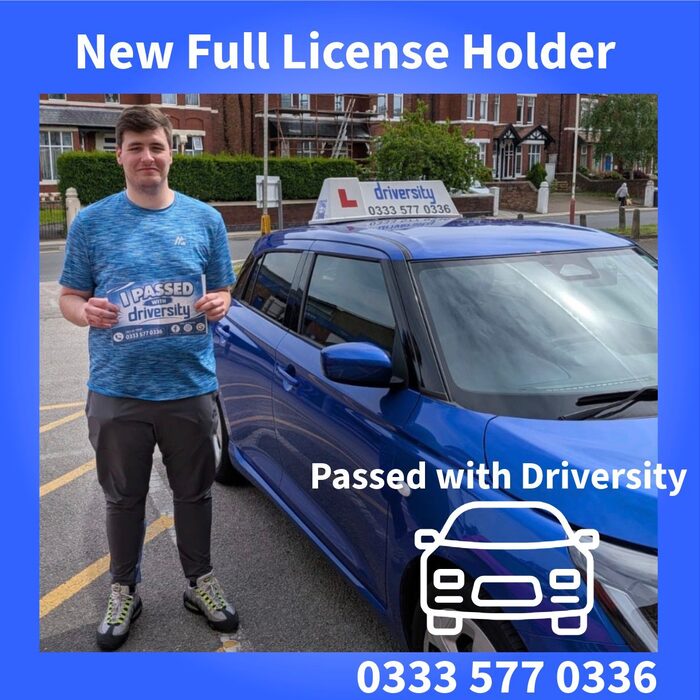
Upload a photo of a pupil who's just passed, pick the pass type — learner test, ADI Part 2 or Part 3 — and it's instantly set into your school's branded congratulations frame. The post every school makes most often, done in seconds.

🎨

Branded graphics

Type what the post is about — "automatic lessons available in Kirkby" — and AI writes the wording for a designed promotional card: kicker, headline, sub-line and call-to-action, rendered in your colours and style. Every field is editable, and the preview updates as you type.

🖼️

AI pictures with a refine loop

Describe any image and AI creates it in your house style. Then simply tell it what to change — "make the car red", "add rain" — and it edits that image rather than starting again. Jump back through version history, and finalise in HD only when you're happy.

✍️

AI captions

A rough idea becomes a polished, platform-appropriate post — celebratory for passes, professional for fleet and B2B. You teach it about your business once, so every draft sounds like you, not a robot. GIF search is built in for lighter posts.

your schoolPASSED ✓
Example framed pass photo — a pupil celebrating their driving test pass in a branded congratulations frame
CONGRATULATIONS!Another first-time pass — we're so proud
The post that matters most

Pass photos, framed in seconds

Nothing sells a driving school like a beaming pupil holding their pass certificate. It's the post your followers love, the one that wins new pupils — and the one that usually means paying a designer or wrestling with templates.

In Social Studio it's one upload and one click. Choose the pass type, and the photo drops straight into your school's branded frame — consistent, professional and ready to share.

  • Learner test, ADI Part 2 and ADI Part 3 frames
  • Your branding on every frame, automatically
  • Done in seconds — no designer, no design fees
The bit nothing else does

Describe it. Tweak it. Done.

Other tools make you start from scratch every time an image isn't quite right. Social Studio works like a conversation: describe the picture you want, then refine it — "remove the cones", "make it rain" — and it edits the existing image, keeping everything you liked.

  • Every image generated in your school's house style
  • Version history — jump back to any earlier attempt
  • Drafts are quick; render in HD only when you're happy
  • Every plan includes a monthly image allowance — the bigger the plan, the more you can create
On-brand, every time

Posts that sound — and look — like you

Tell Social Studio about your business once: the areas you cover, your offers, how you like to sound. From then on, every graphic is rendered in your colours and every caption is written in your voice — celebratory for pass posts, professional for fleet and B2B content.

  • AI-written kicker, headline, sub-line and call-to-action
  • Everything editable, with a live preview
  • Captions tailored to each platform's style
  • Built-in GIF search for lighter posts
From studio to social

Create once, post anywhere

Everything you make comes out finished and ready to share — the image and the caption together. Grab it and post it to Facebook, Instagram or LinkedIn in the same way you post now.

1

Create

Frame a pass photo, build a graphic, generate a picture or draft a caption — all in the Studio.

2

Copy

Download the image and copy the caption — polished, on-brand and written for the platform it's going to.

3

Post

Share it to Facebook, Instagram or LinkedIn — consistent branding on every platform, every time.

FacebookInstagramLinkedIn

Image creation is included through a monthly allowance that grows with your plan — ask us about plans when you enquire.

One module of many

Part of the Training Hub

Social Studio isn't a bolt-on subscription — it's a module inside the Driversity Training Hub, the same system that runs PDI and ADI training records, Standards Check tools, CPD, coverage maps and test routes.

Your training records and your marketing, in one place, in your own school account. Built by instructors, for driving schools.

Explore the full Training Hub
Driversity Hub app icon Driversity Hub The training hub for driving schools
  • Social Studio
  • PDI Tracker
  • Franchise ADIs
  • Standards Check
  • CPD
  • Coverage Map
  • Test Routes

See Social Studio in action

Agency-quality social media in minutes a week — from the same hub that runs your training records. Get in touch for a demo.

✆ CallEnquire